McLeuker Virtual Try-On: Any Garment, on Any Model
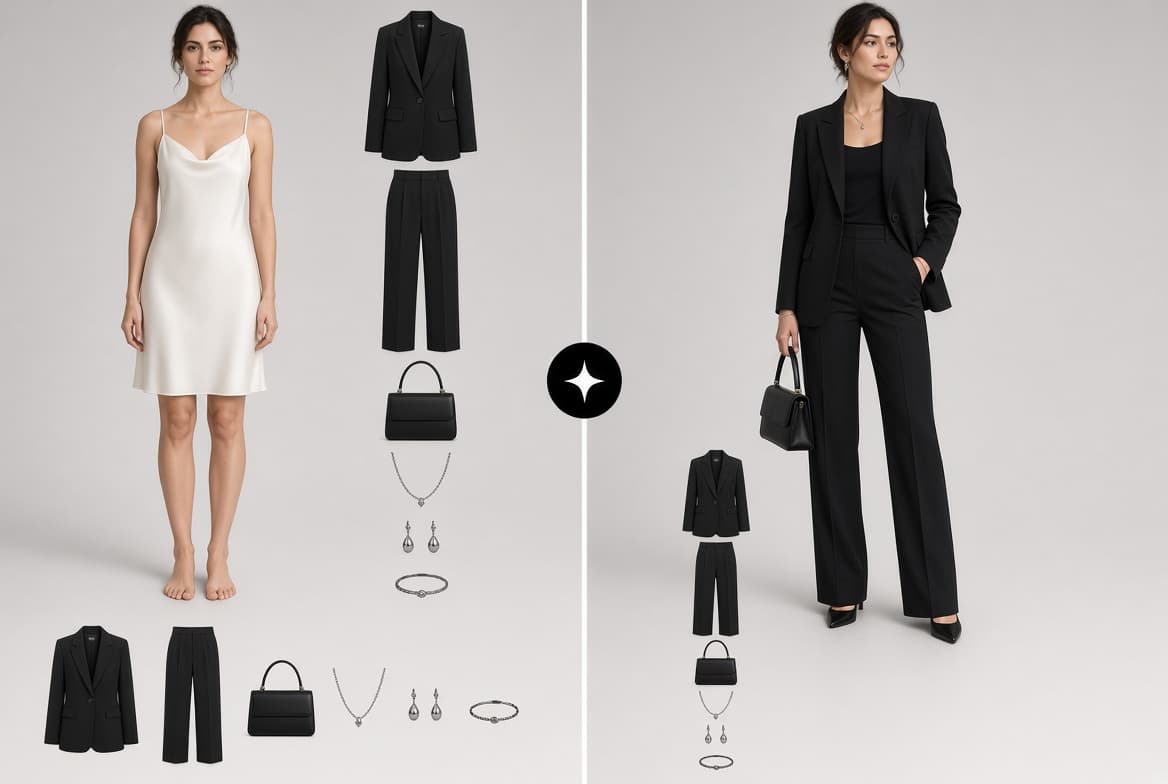
Virtual Try-On puts up to three garment pieces on a model or on your own photo, and renders one styled look front, back, side and detail, in the scene you choose.

McLeuker Virtual Try-On is the studio in McLeuker AI that shows a garment worn before it exists on a body. Upload up to three garment pieces and a model, or your own photo, and it fuses them into one styled look, rendered front, back, side and detail in the scene you choose. A fitting room, not a face filter.
Virtual Try-On in one minute
- What you give it: one to three garment pieces, each under 15 MB, and a model: one from the roster, your own photo, or a group.
- What you get back: one still per view, delivered as each one finishes, and an optional short motion clip.
- What you can set: the scene, the number of looks and which views to render.
- Who it is for: e-commerce teams who need on-model imagery for every product, designers checking a look before sampling, and stylists building outfits.
- Where to start: the Virtual Try-On page explains the flow. Signed in, it has its own studio.
How it works
- Upload the garments and the model. The garment type is detected automatically, so a jacket is treated as a jacket and a skirt as a skirt.
- Pick the views and the scene. The default plan is front, back, side and a detail close-up. You can also ask for three-quarter, walking, seated or editorial views, in studio white, studio grey, street, outdoor, runway, evening, beach or a scene you describe.
- Render the look. Each view streams in as it lands, so you see the first frame long before the last.
What you get back
A styled look shown from every side that matters, in one scene, on one body, with the pieces worn together rather than pasted on. Optionally, a short clip of the same look in motion: a 360 spin, a runway walk, studio poses or a cinematic move, on a single model.
Where it fits across the nine sectors
- Fashion Tech: see a garment on a model before it exists.
- Fashion: show buyers how pieces from the line sheet work together, before samples arrive. Browse the fashion use cases.
- Lifestyle: style an outfit around a single hero piece for a partner presentation.
Briefs to try
- "Our black single-button blazer and tailored trousers on a model from the roster, studio grey, front, back, side and detail."
- "This knit dress on my own photo, street scene, walking view, plus a runway-walk clip."
- "Three pieces from the SS27 line (shirt, trousers, trench) worn together, outdoor, four views."
What it does not do
- It does not predict how a size will fit. It shows how a garment looks worn on the model you chose; it is not a sizing tool.
- It does not take more than three pieces at once. For a full outfit with accessories, build it across two runs or on a whiteboard.
- It does not animate a group. Motion clips are for a single model.
- It does not charge for a failed look. A look that fails is refunded.
Frequently asked questions
What is McLeuker Virtual Try-On?
It is the try-on studio in McLeuker AI, the AI platform built for fashion. It renders up to three garment pieces on a model or your own photo, as one styled look from front, back, side and detail.
Can I use my own photo?
Yes. Pick a model from the roster, upload your own photo, or use a group.
Which views can I get?
Front, back, side and detail close-up by default, plus three-quarter, walking, seated and editorial views.
Does it make video?
Optionally. Add a 360 spin, a runway walk, studio poses or a cinematic clip, on a single model. For the full creative suite, read the new creative features.
McLeuker AI is the AI platform built for fashion: research, creative and production studios that each return a finished file. See them all on the products page, or open Virtual Try-On and see the piece you are still waiting on the sample for.
Filed under
Series · Meet the Studios
10 of 17